Skip to content
KitploitKITPLOIT
ToolsExploitsBlog
Log in
Submit
ToolsExploitsBlog
Submit

Hacking, PenTest, and Cybersecurity Tools for Your Security Arsenal!

Kitploit is a directory of hacking, cybersecurity, and pentesting tools. Discover the latest project updates to find vulnerabilities, analyze systems, automate testing, and strengthen your security.

FeedsContactPrivacy© 2026 Kitploit

Tool Directory

Categories

View all categories
Loading categories
zelos — A comprehensive binary emulation and instrumentation platform. | Kitploit
Tools/GitHubGitHub/zeropointdynamics/zelos
Dynamic Analysis (Sandboxing)Vulnerability AnalysisReverse EngineeringDebuggersMalware AnalysisBinary Analysis
GitHubzeropointdynamics/zelos

zelos

A comprehensive binary emulation and instrumentation platform.

View Repository
42048494 years agoReviewed by Kitploit
Share

PyPI Build Status codecov Documentation Status PyPI - Python Version License: AGPL v3 Code style: black

Zelos

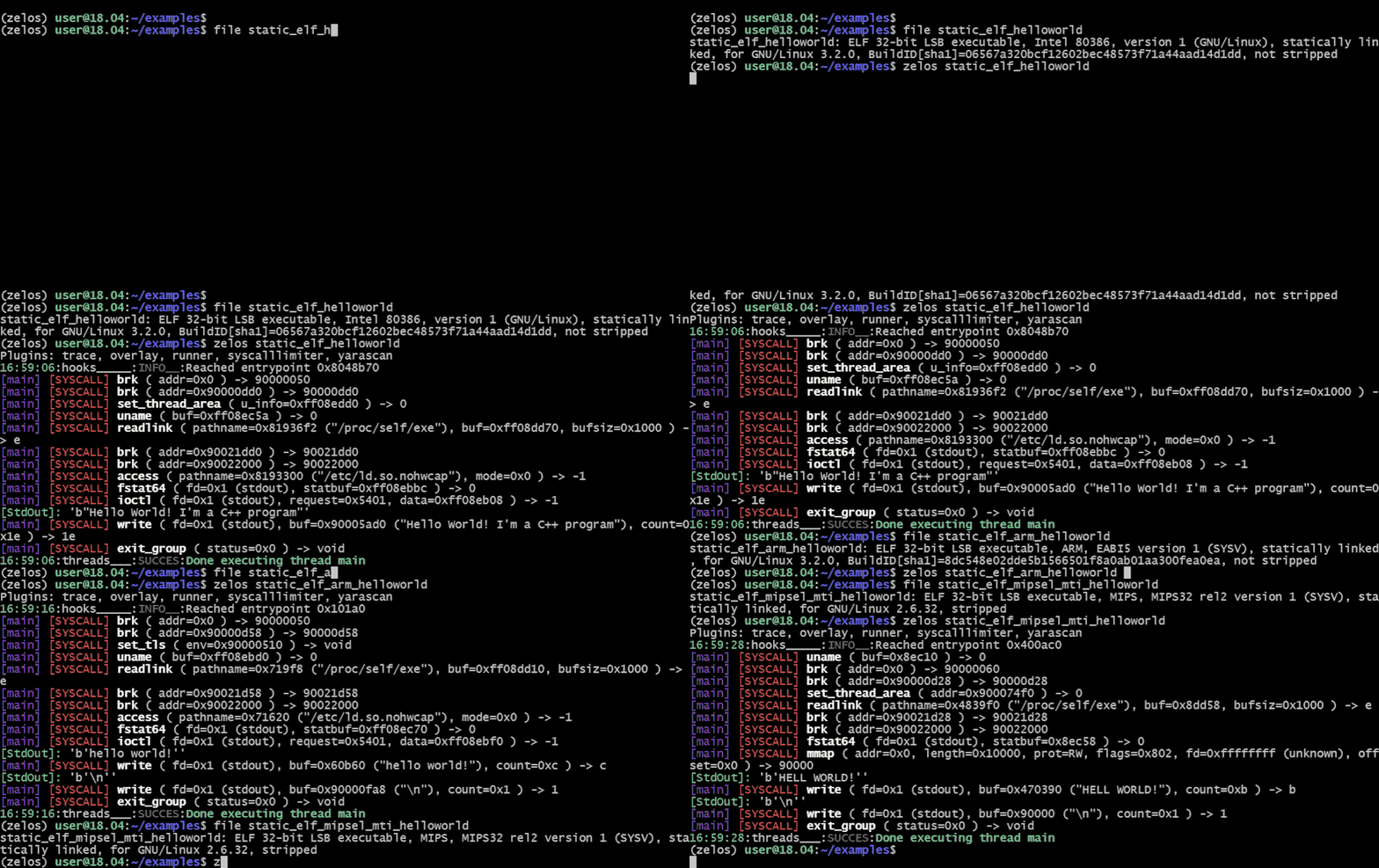
Zelos (Zeropoint Emulated Lightweight Operating System) is a python-based binary emulation platform. One use of zelos is to quickly assess the dynamic behavior of binaries via command-line or python scripts. All syscalls are emulated to isolate the target binary. Linux x86_64 (32- and 64-bit), ARM and MIPS binaries are supported. Unicorn provides CPU emulation.
Image

Full documentation is available here.

Installation

Use the package manager pip to install zelos.

pip install zelos

Basic Usage

Command-line

To emulate a binary with default options:

$ zelos my_binary

To view the instructions that are being executed, add the --inst flag:

$ zelos --inst my_binary

You can print only the first time each instruction is executed, rather than every execution, using --fasttrace:

$ zelos --inst --fasttrace my_binary

By default, syscalls are emitted on stdout. To write syscalls to a file instead, use the --trace_file flag:

$ zelos --trace_file path/to/file my_binary

Specify any command line arguments after the binary name:

$ zelos my_binary arg1 arg2

Programmatic

import zelos

z = zelos.Zelos("my_binary")
z.start(timeout=3)

Plugins

Zelos supports first- and third-party plugins. Some notable plugins thus far:

  • crashd crash analyzer combining execution trace, dataflow and memory sanitization.
  • overlay (ida plugin): highlights zelos execution trace in IDA with instruction-level comments added.
  • angr integration: enables symbolic execution in zelos.
  • zdbserver: remote control and debugging of emulated binaries.
  • syscall limiter: demonstrates event hooking and provides syscall-based execution and termination options.

Contributing

Pull requests are welcome. For major changes, please open an issue first to discuss what you would like to change.

Please make sure to update tests as appropriate.

Local Development Environment

First, create a new python virtual environment. This will ensure no package version conflicts arise:

$ python3 -m venv ~/.venv/zelos
$ source ~/.venv/zelos/bin/activate

Now clone the repository and change into the zelos directory:

(zelos) $ git clone [email protected]:zeropointdynamics/zelos.git
(zelos) $ cd zelos

Install an editable version of zelos into the virtual environment. This makes import zelos available, and any local changes to zelos will be effective immediately:

(zelos) $ pip install -e '.[dev]'

At this point, tests should pass and documentation should build:

(zelos) $ pytest
(zelos) $ cd docs
(zelos) $ make html

Built documentation is found in docs/_build/html/.

Install zelos pre-commit hooks to ensure code style compliance:

(zelos) $ pre-commit install

In addition to automatically running every commit, you can run them anytime with:

(zelos) $ pre-commit run --all-files

Windows Development:

Commands vary slightly on Windows:

C:\> python3 -m venv zelos_venv
C:\> zelos_venv\Scripts\activate.bat
(zelos) C:\> pip install -e .[dev]


License

AGPL v3

Download Tool

Most Popular

View all →

Discover the most used tools by our community.

  • 1

    OsintHunter

    letox4/osinthunter

    🎯 The ultimate OSINT toolkit: investigation graph, confidence scoring, alias families, map, timeline and reports. 49 modules, 400+ sites, no API keys required.

    903
  • 2

    ghostlock-app

    yukonga/ghostlock-app

    GhostLock One-Tap Execution App (CVE-2026-43499)

    842
  • 3

    wifit3

    derv82/wifit3

    Wifite but USB-only & cross-platform.

    668
  • 4

    jumpserver

    jumpserver/jumpserver

    JumpServer is an open-source Privileged Access Management (PAM) platform that provides DevOps and IT teams with on-demand and secure access to SSH, RDP, Kubernetes, Database and RemoteApp endpoints through a web browser.

    446
  • 5

    looking-glass

    anonghosty/looking-glass

    CSIRT platform that ingests Shadowserver reports into MongoDB and replays them as interactive maps, analysis, findings, advisories and executive dashboards.

    429
  • 6

    SafeLine

    chaitin/safeline

    Self-hosted WAF and reverse proxy that filters malicious HTTP traffic, blocks SQL injection, XSS, and bot attacks, with rate limiting and dynamic HTML/JS encryption.

    397

Explore all tools

Browse our collection of tools

View all tools →




