 lightbulb-framework/lightbulb-framework
Tools for auditing WAFS

LightBulb is an open source python framework for auditing web application firewalls and filters.

The framework consists of two main algorithms:
GOFA: An active learning algorithm that infers symbolic representations of automata in the standard membership/equivalence query model.
Active learning algorithms permits the analysis of filter and sanitizer programs remotely, i.e. given only the ability to query the targeted program and observe the output.
SFADiff: A black-box differential testing algorithm based on Symbolic Finite Automata (SFA) learning
Finding differences between programs with similar functionality is an important security problem as such differences can be used for fingerprinting or creating evasion attacks against security software like Web Application Firewalls (WAFs) which are designed to detect malicious inputs to web applications.
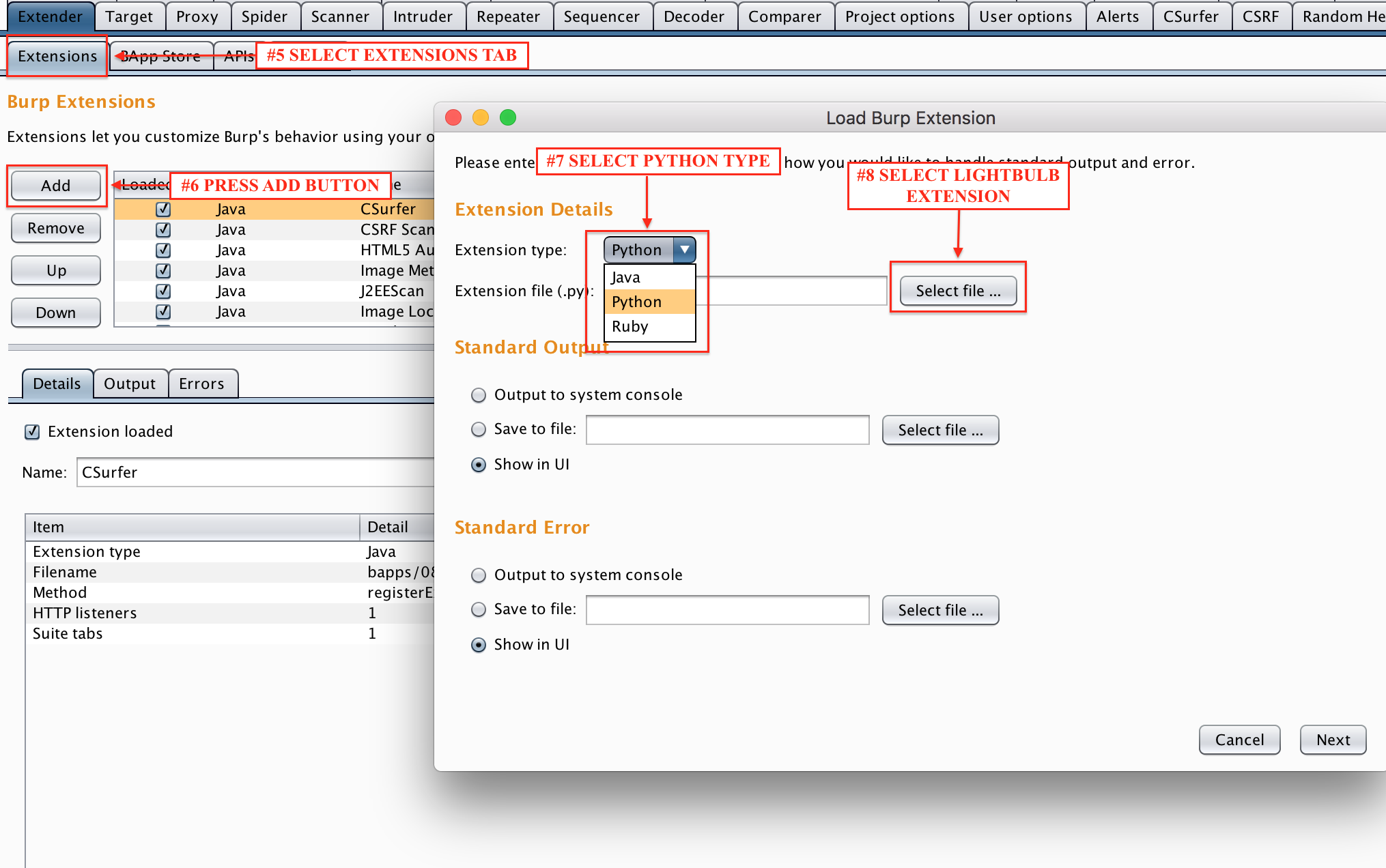
LightBulb is available in BApp Store as an extesion for the Burp Suite. You can directly install LightBulb by navigating at the Burp Extender tab. You can also import latest the standalone version of the extension.
Web Applications Firewalls (WAFs) are fundamental building blocks of modern application security. For example, the PCI standard for organizations handling credit card transactions dictates that any application facing the internet should be either protected by a WAF or successfully pass a code review process. Nevertheless, despite their popularity and importance, auditing web application firewalls remains a challenging and complex task. Finding attacks that bypass the firewall usually requires expert domain knowledge for a specific vulnerability class. Thus, penetration testers not armed with this knowledge are left with publicly available lists of attack strings, like the XSS Cheat Sheet, which are usually insufficient for thoroughly evaluating the security of a WAF product.
In this presentation we introduce a novel, efficient, approach for bypassing WAFs using automata learning algorithms. We show that automata learning algorithms can be used to obtain useful models of WAFs. Given such a model, we show how to construct, either manually or automatically, a grammar describing the set of possible attacks which are then tested against the obtained model for the firewall. Moreover, if our system fails to find an attack, a regular expression model of the firewall is generated for further analysis. Using this technique we found over 10 previously unknown vulnerabilities in popular WAFs such as Mod-Security, PHPIDS and Expose allowing us to mount SQL Injection and XSS attacks bypassing the firewalls. Finally, we present LightBulb, an open source python framework for auditing web applications firewalls using the techniques described above. In the release we include the set of grammars used to find the vulnerabilities presented.

Main interface commands:
| Command | Description |
|---|---|
| core | Shows available core modules |
| utils | Shows available query handlers |
| info <module> | Prints module information |
| library | Enters library |
| modules | Shows available application modules |
| use <module> | Enters module |
| start <moduleA> <moduleB> | Initiate algorithm |
| help | Prints help |
| status | Checks and installs required packages |
| complete | Prints bash completion command |
Module commands:
| Command | Description |
|---|---|
| back | Go back to main menu |
| info | Prints current module information |
| library | Enters library |
| options | Shows available options |
| define <option> <value> | Set an option value |
| start | Initiate algoritm |
| complete | Prints bash completion command |
Library commands:
| Command | Description |
|---|---|
| back | Go back to main menu |
| info <folder\module> | Prints requested module information (folder must be located in lightbulb/data/) |
| cat <folder\module> | Prints requested module (folder must be located in lightbulb/data/) |
| modules <folder> | Shows available library modules in the requested folder (folder must be located in lightbulb/data/) |
| search <keywords> | Searches available library modules using comma separated keywords |
| complete | Prints bash completion command |
First you have to verify that your system supports flex, python dev, pip and build utilities:
For apt platforms (ubuntu, debian...):
    sudo apt-get install flex
	sudo apt-get install python-pip
	sudo apt-get install python-dev
	sudo apt-get install build-essential
(Optional for apt) If you want to add support for MySQL testing:
sudo apt-get install libmysqlclient-dev
For yum platforms (centos, redhat, fedora...) with already installed the extra packages repo (epel-release):
	sudo yum install -y python-pip
	sudo yum install -y python-devel
	sudo yum install -y wget
	sudo yum groupinstall -y 'Development Tools'
(Optional for yum) If you want to add support for MySQL testing:
	sudo yum install -y mysql-devel
	sudo yum install -y MySQL-python
In order to use the application without complete package installation:
git clone https://github.com/lightbulb-framework/lightbulb-framework
cd lightbulb-framework
make
lightbulb status
In order to perform complete package installation. You can also install it from pip repository. This requires first to install the latest setuptools version:
pip install setuptools --upgrade
pip install lightbulb-framework
lightbulb status
If you want to use virtualenv:
pip install virtualenv
virtualenv env
source env/bin/activate
pip install lightbulb-framework
lightbulb status
The "lightbulb status" command will guide you to install MySQLdb and OpenFst support. If you use virtualenv in linux, the "sudo" command will be required only for the installation of libmysqlclient-dev package.
It should be noted that the "lightbulb status" command is not necessary if you are going to use the Burp Extension. The reason is that this command installs the "openfst" and "mysql" bindings and the extension by default is using Jython, which does not support C bindings. It is recommended to use the command only if you want to change the Burp extension configuration from the settings and enable the native support.
It is also possible to use a docker instance:
docker pull lightbulb/lightbulb-framework
If you wish to use the new GUI, you can use the extension for the Burp Suite.
