 reverseclabs/leonidas
Automated Attack Simulation in the Cloud, complete with detection use cases.

This is the repository containing Leonidas, a framework for executing attacker actions in the cloud. It provides a YAML-based format for defining cloud attacker tactics, techniques and procedures (TTPs) and their associated detection properties. These definitions can then be compiled into:
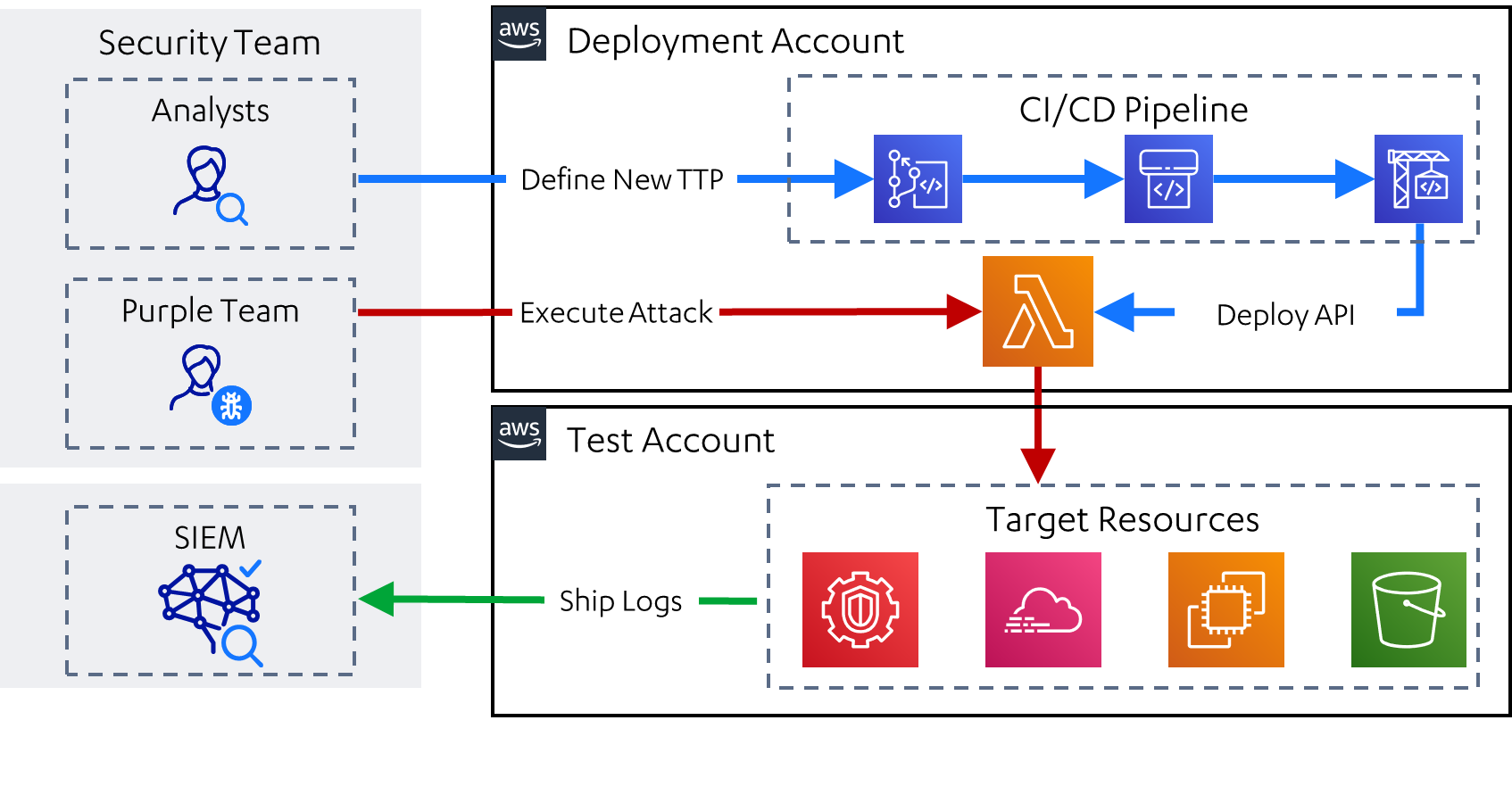
The project was originally designed for use in AWS environments, with the following architecture:
 In 2024, Leonidas was extended to support Kubernetes environments. Its resources can be deployed within the target cluster, as per the following architecture:
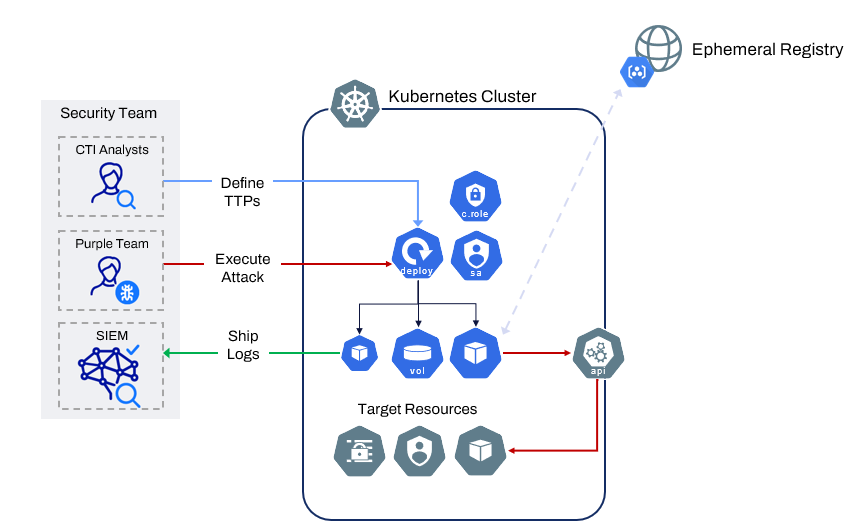
The API is deployed into an AWS account via an AWS-native CI/CD pipeline, and into a Kubernetes cluster using auto-generated YAML manifests. Instructions for both environments can be found at Deploying Leonidas.
The API is invoked via web requests secured by an API key. Details on using the API can be found at Using Leonidas
To build documentation or Sigma rules, you'll need to install the generator locally. You can do this by:
cd generatorpoetry installSigma rules can be generated as follows:
poetry run ./generator.py sigmaThe rules will then appear in ./output/sigma
The documentation is generated as follows:
poetry run ./generator.py docsThis will produce markdown versions of the documentation available at output/docs. This can be uploaded to an existing markdown-based documentation system, or the following can be used to create a prettified HTML version of the docs:
cd ../outputmkdocs buildThis will create an output/site folder containing the HTML site. It is also possible to view this locally by running mkdocs serve in the same folder.
The definitions are written in a YAML-based format, for which an example is provided below. Documentation on how to write these can be found in Writing Definitions
---
name: Enumerate Cloudtrails for a Given Region
author: Nick Jones
description: |
  An adversary may attempt to enumerate the configured trails, to identify what actions will be logged and where they will be logged to. In AWS, this may start with a single call to enumerate the trails applicable to the default region.
category: Discovery
mitre_ids:
  - T1526
platform: aws
permissions:
  - cloudtrail:DescribeTrails
input_arguments:
executors:
  sh:
    code: |
      aws cloudtrail describe-trails
  leonidas_aws:
    implemented: True
    clients:
      - cloudtrail
    code: |
      result = clients["cloudtrail"].describe_trails()
detection:
  sigma_id: 48653a63-085a-4a3b-88be-9680e9adb449
  status: experimental
  level: low
  sources:
    - name: "cloudtrail"
      attributes:
        eventName: "DescribeTrails"
        eventSource: "*.cloudtrail.amazonaws.com"
Project built and maintained by Nick Jones ( NJonesUK / @nojonesuk).
Kubernetes support added by Leo Tsaousis ( @laripping ).
Special thanks also to Mohit Gupta ( @Skybound1 ) for his invaluable contribution.
This project drew ideas and inspiration from a range of sources, including:






