 hawkeyesec/scanner-cli
A project security/vulnerability/risk scanning tool

There are more modern options out there for you and your project. If you wish to pick up maintenance of the project, please feel free to contact me. You'll find means of reaching out to me on my personal homepage.
.
.
.
.
.
.
The Hawkeye scanner-cli is a project security, vulnerability and general risk highlighting tool. It is meant to be integrated into your pre-commit hooks and your pipelines.
The Hawkeye scanner-cli assumes that your directory structure is such that it keeps the toolchain's files on top level. Roughly, this is what it boils down to:
package.json on top levelGemfile on top levelrequirements.txt on top levelcomposer.lock on top levelbuild (gradle) or target (maven) folder, and include .java and .jar filesbuild (gradle) or target (maven) folder, and include .kt and .jar filestarget (sbt with sbt-native-packager or sbt-assembly plugins) folder, and include
.scala and .jar files. Check this repo for a running demo.Cargo.toml on top levelThis is not exhaustive as sometimes tools require further files to exist. To understand how the modules decide whether they can handle a project, please check the How it works section and the modules folder.
The docker image is hands-down the easiest way to the scanner. Please note that your project root (e.g. $PWD) needs to be mounted to /target.
docker run --rm -v $PWD:/target hawkeyesec/scanner-cli:latest
If you are using the scanner to write a JSON (via the -j and --json CLI flags and the json setting in the .hawkeyerc), make sure that it uses the correct UID and GID via docker run -u $(id -u):$(id -g). Otherwise this might leave you with undeletable files, e.g. when running in Jenkins.
The docker build is also the recommended way to run the scanner in your CI pipelines. This is an example of running Hawkeye against one of your projects in GoCD:
<pipeline name="security-scan">
  <stage name="Hawkeye" cleanWorkingDir="true">
    <jobs>
      <job name="scan">
        <tasks>
          <exec command="docker">
            <arg>pull</arg>
            <arg>hawkeyesec/scanner-cli</arg>
            <runif status="passed" />
          </exec>
          <exec command="bash">
            <arg>-c</arg>
            <arg>docker run --rm -v $PWD:/target hawkeyesec/scanner-cli:latest</arg>
            <runif status="passed" />
          </exec>
        </tasks>
      </job>
    </jobs>
  </stage>
</pipeline>
You can install and run hawkeye in a Node.js project via
npm install --save-dev @hawkeyesec/scanner-cli
npx hawkeye scan
This method is recommended in a Node.js project, where the other toolchains (e.g. python, ruby) are not required.
With this method, it is also recommended to invoke the scanner in a git pre-commit hook (e.g. via the pre-commit package) to fail the commit if issues are found.
You can configure the scanner via .hawkeyerc and .hawkeyeignore files in your project root.
The .hawkeyerc file is a JSON file that allows you to configure ...
{
    "all": true|false,
    "staged": true|false,
    "modules": ["files-ccnumber", "java-owasp", "java-find-secbugs"],
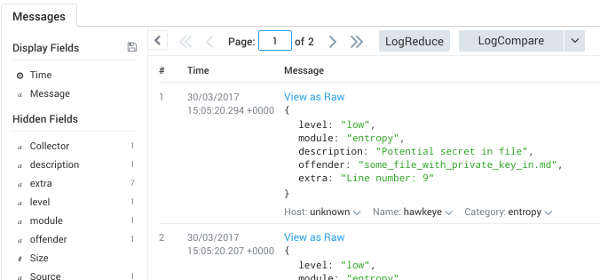
    "sumo": "http://your.sumologic.foobar/collector",
    "http": "http://your.logger.foobar/collector",
    "json": "log/results.json",
    "failOn": "low"|"medium"|"high"|"critical",
    "showCode": true|false
}
The .hawkeyeignore file is a collection of regular expressions matching paths and module error codes to exclude from the scan, and is equivalent to using the --exclude flag. Lines starting with # are regarded as comments.
Please note that any special charaters reserved in regular expressions (-[]{}()*+?.,^$|#\s) need to be escaped when used as a literal!
Please also note that the module error codes are usually not shown, since they are not primarily relevant for the user. If you want to exclude a certain false positive, you can display the module error codes with the flag --show-code or the showCode property in the .hawkeyerc.
^test/

# this is a comment

^README.md
Use hawkeye modules to list the available modules and their status.
> npx hawkeye modules
[info] Version: v1.4.0
[info] Module Status
[info] Enabled:   files-ccnumber
[info]            Scans for suspicious file contents that are likely to contain credit card numbers
[info] Enabled:   files-contents
[info]            Scans for suspicious file contents that are likely to contain secrets
[info] Disabled:  files-entropy
[info]            Scans files for strings with high entropy that are likely to contain passwords
[info] Enabled:   files-secrets
[info]            Scans for suspicious filenames that are likely to contain secrets
[info] Enabled:   java-find-secbugs
[info]            Finds common security issues in Java code with findsecbugs
[info] Enabled:   java-owasp
[info]            Scans Java projects for gradle/maven dependencies with known vulnerabilities with the OWASP dependency checker
[info] Enabled:   node-npmaudit
[info]            Checks node projects for dependencies with known vulnerabilities
[info] Enabled:   node-npmoutdated
[info]            Checks node projects for outdated npm modules
[info] Enabled:   node-yarnaudit
[info]            Checks yarn projects for dependencies with known vulnerabilities
[info] Enabled:   node-yarnoutdated
[info]            Checks node projects for outdated yarn modules
[info] Enabled:   php-security-checker
[info]            Checks whether the composer.lock contains dependencies with known vulnerabilities using security-checker
[info] Enabled:   python-bandit
[info]            Scans for common security issues in Python code with bandit.
[info] Enabled:   python-piprot
[info]            Scans python dependencies for out of date packages
[info] Enabled:   python-safety
[info]            Checks python dependencies for known security vulnerabilities with the safety tool.
[info] Enabled:   ruby-brakeman
[info]            Statically analyzes Rails code for security issues with Brakeman.
[info] Enabled:   ruby-bundler-scan
[info]            Scan for Ruby gems with known vulnerabilities using bundler
Use hawkeye scan to kick off a scan:
> npx hawkeye scan --help
[info] Version: v1.3.0
Usage: hawkeye-scan [options]






