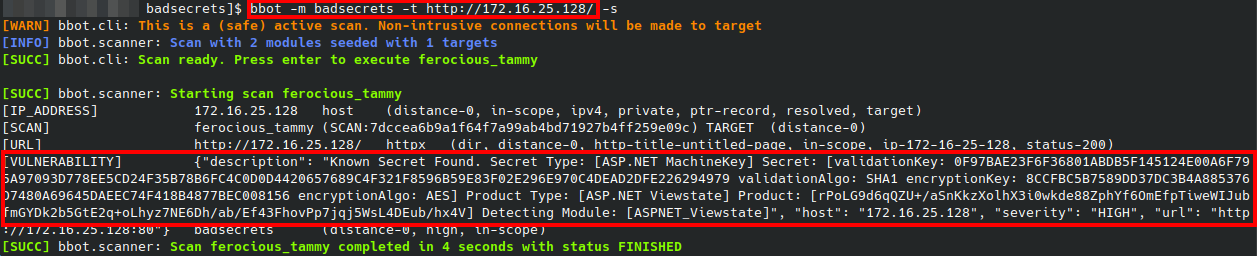
 blacklanternsecurity/badsecrets
A library for detecting known secrets across many web frameworks





A pure python library for identifying the use of known or very weak cryptographic secrets across a variety of platforms. The project is designed to be both a repository of various "known secrets" (for example, ASP.NET machine keys found in examples in tutorials), and to provide a language-agnostic abstraction layer for identifying their use.
Knowing when a 'bad secret' was used is usually a matter of examining some cryptographic product in which the secret was used: for example, a cookie which is signed with a keyed hashing algorithm. Things can get complicated when you dive into the individual implementation oddities each platform provides, which this library aims to alleviate.
Check out our full blog post on the Black Lantern Security blog!
Inspired by Blacklist3r, with a desire to expand on the supported platforms and remove language and operating system dependencies.
Passive modules analyze cryptographic products (cookies, tokens, signed URLs, etc.) that you already have. They work offline by attempting to decrypt or verify the product against a database of known secrets.
| Name | Description |
|---|---|
| ASPNET_Viewstate | Checks the viewstate/generator against a list of known machine keys. |
| ASPNET_Resource | Checks WebResource.axd and ScriptResource.axd encrypted URLs against a list of known machine keys. Useful when __VIEWSTATE is not present on a page. |
| Telerik_HashKey | Checks patched (2017+) versions of Telerik UI for a known Telerik.Upload.ConfigurationHashKey |
| Telerik_EncryptionKey | Checks patched (2017+) versions of Telerik UI for a known Telerik.Web.UI.DialogParametersEncryptionKey |
| Flask_SignedCookies | Checks for weak Flask cookie signing password. Wrapper for flask-unsign |
| Peoplesoft_PSToken | Can check a peoplesoft PS_TOKEN for a bad/weak signing password |
| Django_SignedCookies | Checks django's session cookies (when in signed_cookie mode) for known django secret_key |
| Rails_SecretKeyBase | Checks Ruby on Rails signed or encrypted session cookies (from multiple major releases) for known secret_key_base |
| Generic_JWT | Checks JWTs for known HMAC secrets or RSA private keys |
| Jsf_viewstate | Checks Both Mojarra and Myfaces implimentations of Java Server Faces (JSF) for use of known or weak secret keys |
| Symfony_SignedURL | Checks symfony "_fragment" urls for known HMAC key. Operates on Full URL, including hash |
| Express_SignedCookies_ES | Checks express.js express-session middleware for signed cookies and session cookies for known 'session secret' |
| Express_SignedCookies_CS | Checks express.js cookie-session middleware for signed cookies and session cookies for known secret |
| Laravel_SignedCookies | Checks 'laravel_session' cookies for known laravel 'APP_KEY' |
| ASPNET_Compressedviewstate | Checks for a once popular custom compressed Viewstate code snippet vulnerable to RCE |
| Rack2_SignedCookies | Checks Rack 2.x signed cookies for known secret keys |
| Yii2_SignedCookies | Checks Yii2 framework signed cookies for known cookie validation keys |
| Shiro_RememberMe | Checks Apache Shiro rememberMe cookies for known AES encryption keys |
| LTPA_Token | Checks IBM WebSphere LtpaToken and LtpaToken2 cookies for known LTPA encryption keys |
Active modules go a step beyond passive detection. They use YARA-based prefiltering to fingerprint a live target (based on HTTP response headers, cookies, and body content), then forge cryptographic products with known keys and send them to the target to confirm whether the key is accepted. This makes them useful for cases where you don't already have a token to analyze but suspect the target may be using default or well-known secrets.
Active modules are enabled by default in URL mode (--url). Use --passive-only to disable them.
| Name | Description |
|---|---|
| Shiro_RememberMe_Key | Forges Apache Shiro rememberMe cookies with known AES keys and tests if the target accepts them (deserialization RCE) |
| GlobalProtect_DefaultMasterKey | Tests PAN-OS GlobalProtect portals for use of the default master encryption key |
| LTPA_Token_Key | Forges IBM WebSphere LtpaToken2 cookies with known LTPA keys and tests if the target grants authentication (auth bypass) |
We have a pypi package, so you can just do pip install badsecrets to make use of the library.
The best way to use Badsecrets is by simply running badsecrets after doing a pip install:
pip install badsecrets
badsecrets eyJhbGciOiJIUzI1NiJ9.eyJJc3N1ZXIiOiJJc3N1ZXIiLCJVc2VybmFtZSI6IkJhZFNlY3JldHMiLCJleHAiOjE1OTMxMzM0ODMsImlhdCI6MTQ2NjkwMzA4M30.ovqRikAo_0kKJ0GVrAwQlezymxrLGjcEiW_s3UJMMCo
Under the hood, it's using the cli.py example. The CLI can also be accessed manually without a pip installation:
git clone https://github.com/blacklanternsecurity/badsecrets.git
cd badsecrets
python ./badsecrets/examples/cli.py eyJhbGciOiJIUzI1NiJ9.eyJJc3N1ZXIiOiJJc3N1ZXIiLCJVc2VybmFtZSI6IkJhZFNlY3JldHMiLCJleHAiOjE1OTMxMzM0ODMsImlhdCI6MTQ2NjkwMzA4M30.ovqRikAo_0kKJ0GVrAwQlezymxrLGjcEiW_s3UJMMCo
To use the examples, after doing the pip install just git clone the repo and cd into the badsecrets directory:
git clone https://github.com/blacklanternsecurity/badsecrets.git
cd badsecrets
The commands in the example section below assume you are in this directory.
If you are using the Badsecrets BBOT module, you don't need to do anything else - BBOT will install the package for you.
Bad secrets includes an example CLI for convenience when manually checking secrets. As mentioned above, it is also accessible by just executing badsecrets, after a successful pip install.
usage: badsecrets [-h] [-nc] [-j] [-u URL] [-nh] [-c FILE_OR_MODULE:KEYS]
                  [-p PROXY] [-a USER_AGENT] [-H HEADER] [-d] [-t TIMEOUT]
                  [-P] [-l]
                  [product ...]

Check cryptographic products against badsecrets library

positional arguments:
  product               Cryptographic product to check for known secrets

