 h3xduck/triplecross
A Linux eBPF rootkit with a backdoor, C2, library injection, execution hijacking, persistence and stealth capabilities.




TripleCross is a Linux eBPF rootkit that demonstrates the offensive capabilities of the eBPF technology.
TripleCross is inspired by previous implant designs in this area, notably the works of Jeff Dileo at DEFCON 271, Pat Hogan at DEFCON 292, Guillaume Fournier and Sylvain Afchain also at DEFCON 293, and Kris Nóva's Boopkit4. We reuse and extend some of the techniques pioneered by these previous explorations of the offensive capabilities of eBPF technology.
This rootkit was created for my Bachelor's Thesis at UC3M. More details about its design are provided in the thesis document.
This rookit is purely for educational and academic purposes. The software is provided "as is" and the authors are not responsible for any damage or mishaps that may occur during its use.
Do not attempt to use TripleCross to violate the law. Misuse of the provided software and information may result in criminal charges.
The following figure shows the architecture of TripleCross and its modules.
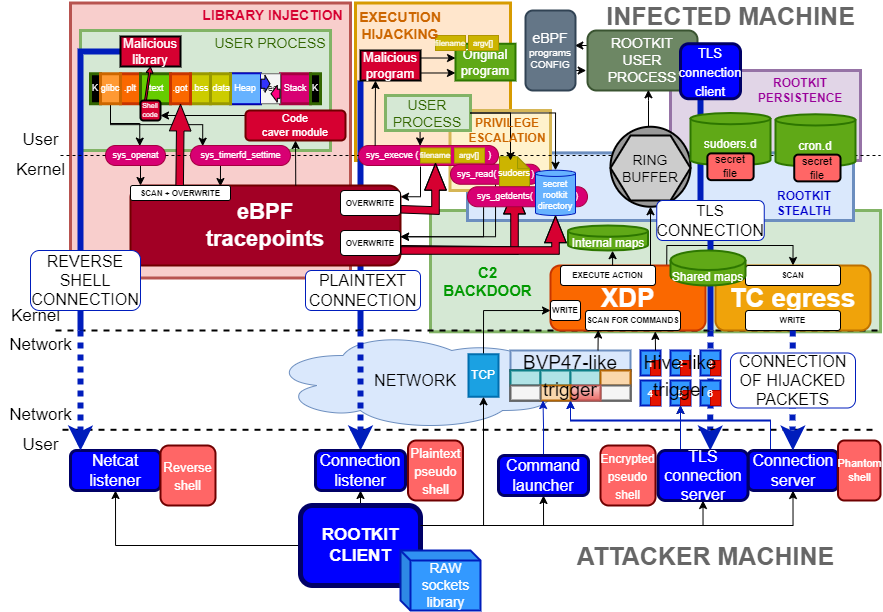
The raw sockets library RawTCP_Lib used for rootkit transmissions is of my authorship and has its own repository.
The following table describes the main source code files and directories to ease its navigation:
| DIRECTORY | COMMAND |
|---|---|
| docs | Original thesis document |
| src/client | Source code of the rootkit client |
| src/client/lib | RawTCP_Lib shared library |
| src/common | Constants and configuration for the rootkit. It also includes the implementation of elements common to the eBPF and user space side of the rootkit, such as the ring buffer |
| src/ebpf | Source code of the eBPF programs used by the rootkit |
| src/helpers | Includes programs for testing the functionality of several rootkit modules, and also the malicious program and library used at the execution hijacking and library injection modules, respectively |
| src/libbpf | Contains the libbpf library integrated with the rootkit |
| src/user | Source code of the userland programs used by the rootkits |
| src/vmlinux | Headers containing the definition of kernel data structures (this is the recommended method when using libbpf) |
This research project has been tested under the following environments:
| DISTRIBUTION | KERNEL | GCC | CLANG | GLIBC | |
|---|---|---|---|---|---|
| VERSION | Ubuntu 21.04 | 5.11.0 | 10.3.0 | 12.0.0 | 2.33 |
We recommend using Ubuntu 21.04, which by default will incorporate the software versions shown here. Otherwise, some of the problems you may run into are described here.
The rootkit source code is compiled using two Makefiles.
# Build rootkit
cd src
make all
# Build rootkit client
cd client
make
The following table describes the purpose of each Makefile in detail:
| MAKEFILE | COMMAND | DESCRIPTION | RESULTING FILES |
|---|---|---|---|
| src/client/Makefile | make | Compilation of the rootkit client | src/client/injector |
| src/Makefile | make help | Compilation of programs for testing rootkit capabilities, and the malicious program and library of the execution hijacking and library injection modules, respectively | src/helpers/simple_timer, src/helpers/simple_open, src/helpers/simple_execve, src/helpers/lib_injection.so, src/helpers/execve_hijack |
| src/Makefile | make kit | Compilation of the rootkit using the libbpf library | src/bin/kit |
| src/Makefile | make tckit | Compilation of the rootkit TC egress program | src/bin/tc.o |
Once the rootkit files are generated under src/bin/, the tc.o and kit programs must be loaded in order. In the following example, the rootkit backdoor will operate in the network interface enp0s3:
// TC egress program
sudo tc qdisc add dev enp0s3 clsact
sudo tc filter add dev enp0s3 egress bpf direct-action obj bin/tc.o sec classifier/egress
// Libbpf-powered rootkit
sudo ./bin/kit -t enp0s3
There are two scripts, packager.sh and deployer.sh, that compile and install the rootkit automatically, just as an attacker would do in a real attack scenario.
Executing packager.sh will generate all rootkit files under the apps/ directory.
Executing deployer.sh will install the rootkit and create the persistence files.
These scripts must first be configured with the following parameters for the proper functioning of the persistence module:
| SCRIPT | CONSTANT | DESCRIPTION |
|---|---|---|
| src/helpers/deployer.sh | CRON_PERSIST | Cron job to execute after reboot |
| src/helpers/deployer.sh | SUDO_PERSIST | Sudo entry to grant password-less privileges |

