Skip to content
KitploitKITPLOIT
ToolsExploitsBlog
Log in
Submit
ToolsExploitsBlog
Submit

Hacking, PenTest, and Cybersecurity Tools for Your Security Arsenal!

Kitploit is a directory of hacking, cybersecurity, and pentesting tools. Discover the latest project updates to find vulnerabilities, analyze systems, automate testing, and strengthen your security.

FeedsContactPrivacy© 2026 Kitploit

Tool Directory

Categories

View all categories
Loading categories
reconmap — Reconmap is a collaboration-first security operations platform for infosec teams and MSSPs, enabling end‑to‑end engagement management, from reconnaissance through execution and reporting. With built-in command automation, output parsing, and AI‑assisted summaries, it delivers faster, more structured, and high‑quality security assessments. | Kitploit
Tools/GitHubGitHub/reconmap/reconmap
Penetration Testing FrameworksVulnerability ScannersPenetration TestingDevSecOpsAI Security
GitHubreconmap/reconmap

reconmap

View Repository
972137657 days agoReviewed by Kitploit
Website

Most Popular

View all →

Discover the most used tools by our community.

  • 1

    OsintHunter

    letox4/osinthunter

    🎯 The ultimate OSINT toolkit: investigation graph, confidence scoring, alias families, map, timeline and reports. 49 modules, 400+ sites, no API keys required.

    1.0k
  • 2

    ghostlock-app

    yukonga/ghostlock-app

    GhostLock One-Tap Execution App (CVE-2026-43499)

    647
  • 3

    looking-glass

    anonghosty/looking-glass

    CSIRT platform that ingests Shadowserver reports into MongoDB and replays them as interactive maps, analysis, findings, advisories and executive dashboards.

    421
  • 4

    jumpserver

    jumpserver/jumpserver

    JumpServer is an open-source Privileged Access Management (PAM) platform that provides DevOps and IT teams with on-demand and secure access to SSH, RDP, Kubernetes, Database and RemoteApp endpoints through a web browser.

    389
  • 5

    ARTEX

    baarai/artex

    LLM multi-agent autonomous penetration testing platform with planner/worker agents, asset and exploration graphs, MITM traffic recording, and vulnerability retesting.

    333
  • 6

    SafeLine

    chaitin/safeline

    Self-hosted WAF and reverse proxy that filters malicious HTTP traffic, blocks SQL injection, XSS, and bot attacks, with rate limiting and dynamic HTML/JS encryption.

    331

Explore all tools

Browse our collection of tools

View all tools →

About

Reconmap is a collaboration-first security operations platform for infosec teams and MSSPs, enabling end‑to‑end engagement management, from reconnaissance through execution and reporting. With built-in command automation, output parsing, and AI‑assisted summaries, it delivers faster, more structured, and high‑quality security assessments.

Share

Reconmap

YouTube

AI-powered finding scanning and reporting for teams running many engagements.

Give it a target. Reconmap plans the scan, runs the tools, triages the findings and writes the report. Every engagement lives in one place, so your team spends its time on the work that needs a human.
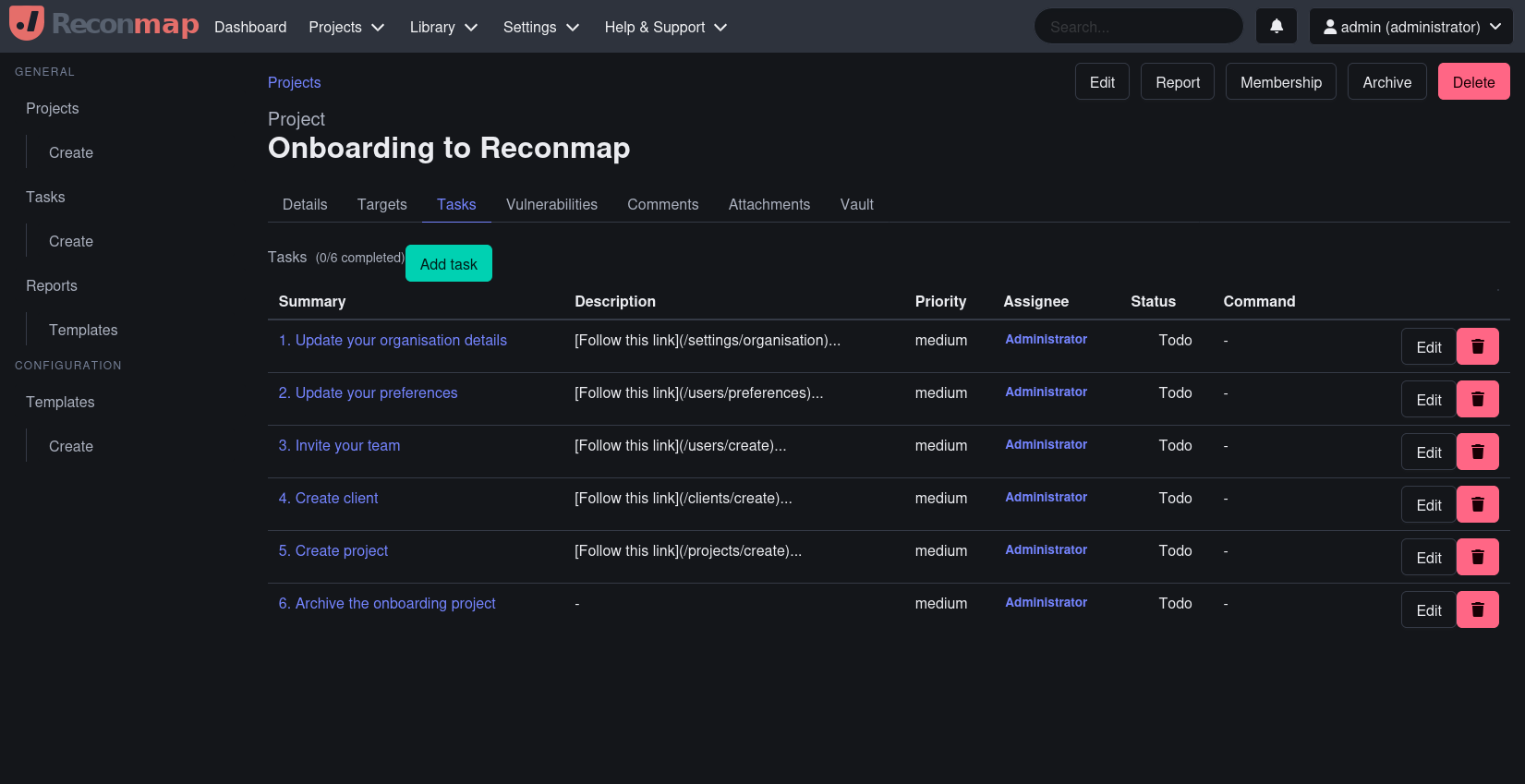
Reconmap's screenshot

What it does

  • Plans scans. Enter a URL, domain, IP or repo. The AI picks the tools from your command catalog, orders them, and queues the run.
  • Runs them anywhere. Runners execute commands on your own machines and send the output back.
  • Parses everything. Built-in parsers for SARIF, CycloneDX, Nmap, Testssl, Subfinder and more. Anything else goes through the LLM parser.
  • Triages automatically. Every new finding gets a severity check, exploitability, affected surface, next steps and a false-positive assessment.
  • Writes the fix. Generate remediation steps per finding, or suggest next commands per asset.
  • Reports. Export to Word, Markdown or HTML.
  • Scales across engagements. Many projects, many people, SSO through Keycloak.
  • Bring your own model. Ollama for fully local inference, or Azure OpenAI, OpenRouter and other OpenAI-compatible endpoints.
  • MCP server. Let your AI assistant query and drive Reconmap.

Quickstart

You need Docker and Docker Compose.

docker compose up -d

Open http://localhost:5500.

Prefer not to install anything? Try the live demo or use the hosted version at netfoe.com.

Under the hood

ComponentStackPath
DashboardReactsrc/dashboard
APIC# / .NET 10src/server
Runner (reconmapd)Gosrc/runner
CLI (rmap)Gosrc/cli

PostgreSQL for data, Redis for cache, Keycloak for auth.

Documentation

User, admin and developer manuals: https://reconmap.com. See AI features for model setup and data handling.

Contributing

  • ⭐ Star this project on GitHub to show your support, help others discover it and be notified of new releases.
  • Fix or extend the docs.
  • Share your ideas or suggest new features on Discussions.
  • Contribute to the project by sending pull requests.
  • Report bugs and security issues in Issues.

Read the Contributing Guidelines first.

Sponsors and supporters


Download Tool