
 spaceraccoon/manuka
A modular OSINT honeypot for blue teamers



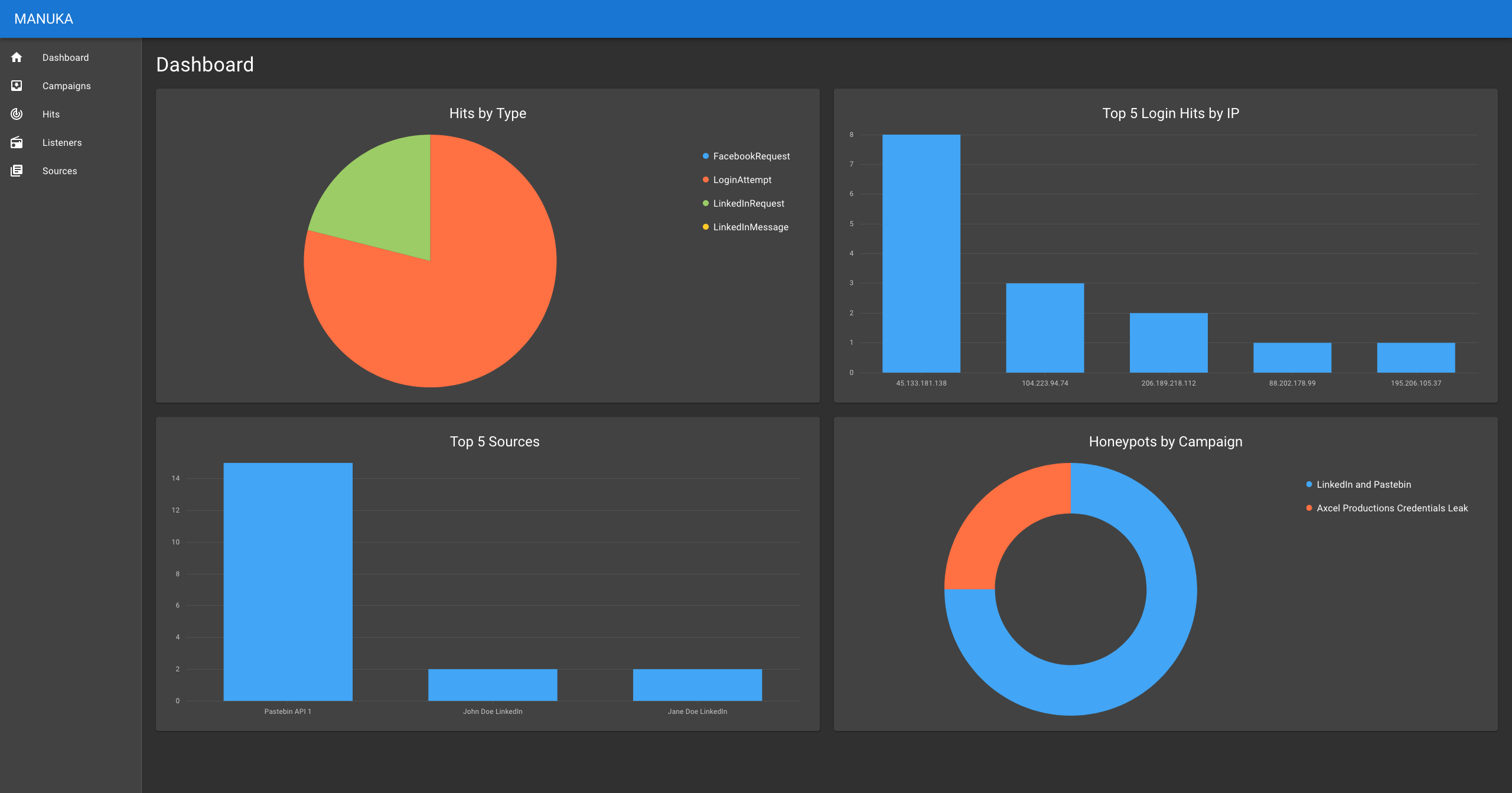
Manuka is an Open-source intelligence (OSINT) honeypot that monitors reconnaissance attempts by threat actors and generates actionable intelligence for Blue Teamers. It creates a simulated environment consisting of staged OSINT sources, such as social media profiles and leaked credentials, and tracks signs of adversary interest, closely aligning to MITRE’s PRE-ATT&CK framework. Manuka gives Blue Teams additional visibility of the pre-attack reconnaissance phase and generates early-warning signals for defenders.
Although they vary in scale and sophistication, most traditional honeypots focus on networks. These honeypots uncover attackers at Stage 2 (Weaponization) to 7 (Actions on Objectives) of the cyber kill chain, with the assumption that attackers are already probing the network.
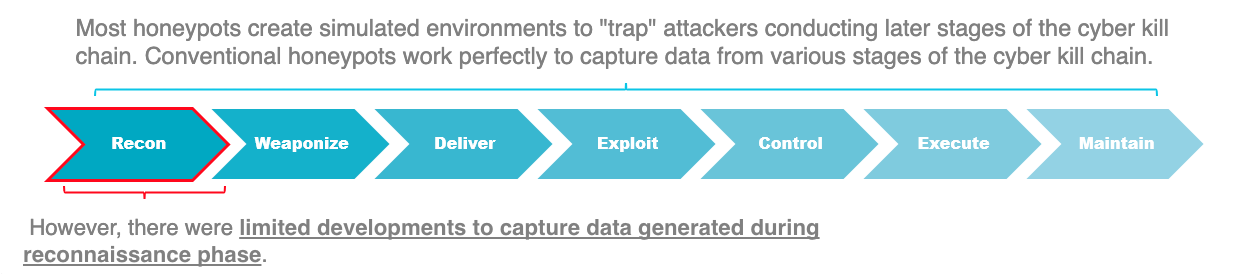
Manuka conducts OSINT threat detection at Stage 1 (Reconnaissance) of the cyber kill chain. Despite investing millions of dollars into network defenses, organisations can be easily compromised through a single Google search. One recent example is hackers exposing corporate meetings, therapy sessions, and college classes through Zoom calls left on the open Web. Enterprises need to detect these OSINT threats on their perimeter but lack the tools to do so.
Manuka is built to scale. Users can easily add new listener modules and plug them into the Dockerized environment. They can coordinate multiple campaigns and honeypots simultaneously to broaden the honeypot surface. Furthermore, users can quickly customize and deploy Manuka to match different use cases. Manuka’s data is designed to be easily ported to other third-party analysis and visualization tools in an organisation’s workflow.
Designing an OSINT honeypot presents a novel challenge due to the complexity and wide range of OSINT techniques. However, such a tool would allow Blue Teamers to “shift left” in their cyber threat intelligence strategy.
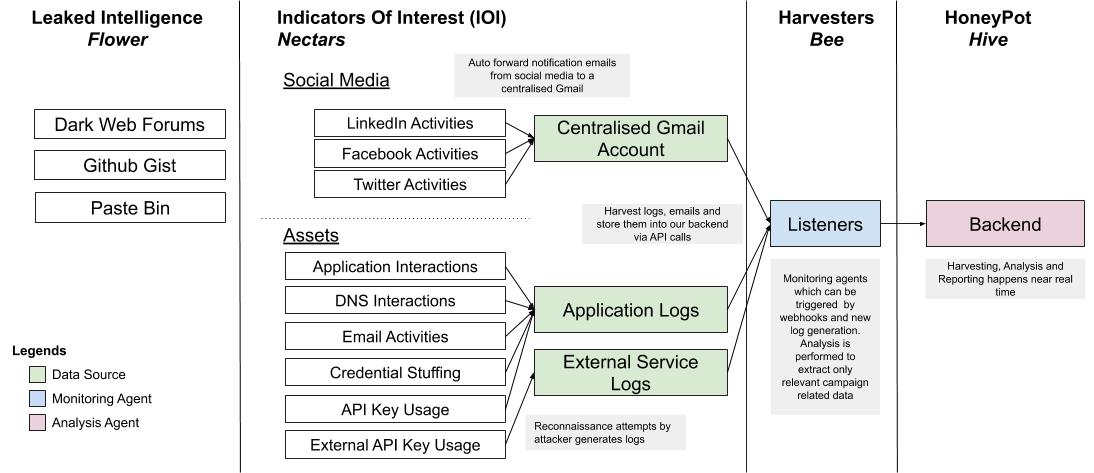
Manuka is built on the following key terms and processes.
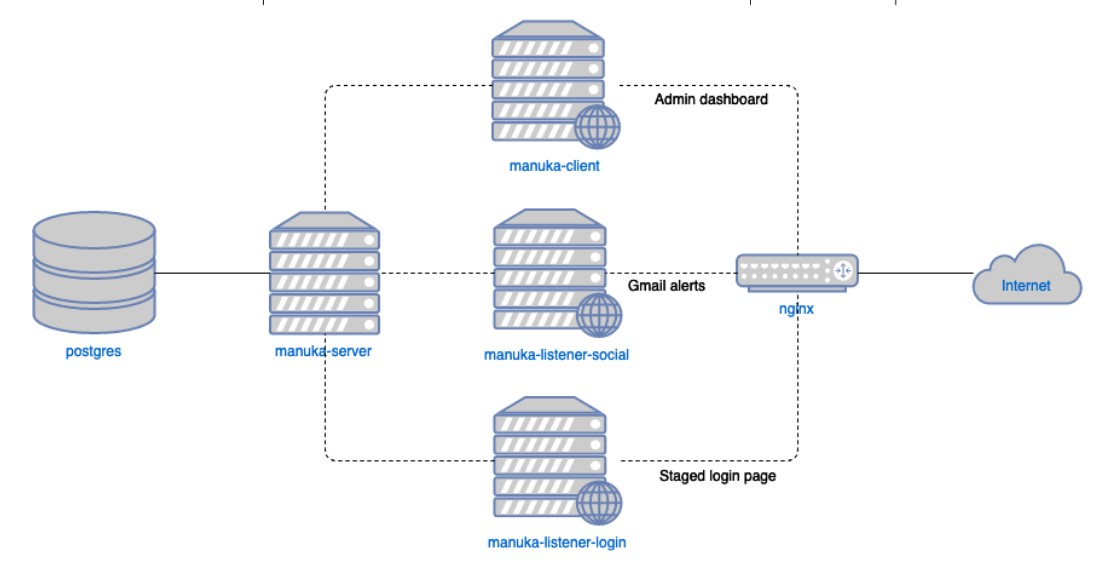
The framework itself consists of several Docker containers which can be deployed on a single host.
These containers are orchestrated through a single docker-compose command.
In development, the components run on the following ports in their respective containers:
manuka-client: 3000manuka-server: 8080manuka-listener: 8080To allow for the client and server to talk without CORS issues, an additional nginx layer on localhost:8080 proxy-passes /api/ to manuka-server amd / to manuka-listener.
In addition, manuka-listener operates on the following ports:
8081 for the staged login webpage8082 for interacting with the staged emailSee the individual component repositories for their requirements.
docker >= 19.03.8docker-compose >= 1.25.4ngok >= 2.3.35docker/secrets/postgres_password with the password for Postgres.docker/secrets/google_credentials.json with your project's credentials.docker/secrets/google_topic.docker/secrets/google_oauth2_token.json.docker-compose -f docker-compose.yml -f docker-compose-dev.yml up --build --remove-orphansmanuka-listener gmail push service:
./ngok http <manuka-listener port> and take note of the https URL.POST /notifications 200 OK on the ngrok console, and Received push notification on the Docker console.In production, the following ports map to these servers:
8080: manuka-client at / and manuka-server at /api80: manuka-listener-login at / and manuka-listener-social at /notificationsThis allows any domain that points to your server to appear as the fake login page, while the administration dashboard is available at port 8080. Furthermore, the administration dashboard is protected by HTTP basic authentication at the nginx layer.
See the individual component repositories for their requirements.
docker >= 19.03.8docker-compose >= 1.25.4ngok >= 2.3.35http://DOMAIN/notifications.docker/nginx/nginx.prod.conf.example to docker/nginx/nginx.prod.conf and replace examplecompany.com with your production domain.init-letsencrypt.sh to generate your SSL certificates.COMPANY_NAME='Next Clarity Financial' NGINX_USERNAME=username NGINX_PASSWORD=password docker-compose -f docker-compose.yml -f docker-compose-prod.yml up --build --remove-orphans -d
NGINX_USERNAME and NGINX_PASSWORD will be your dashboard basic authentication.COMPANY_NAME will be the fake login page company name.Social Listener
Monitors for social activities on Facebook and LinkedIn. Currently supports notification of network connection attempts. Note that the monitored social media account(s) should have email notification enabled. The corresponding email account(s) receiving the email notifications from the social media platforms should be configured to forward these emails to the centralised gmail account.
Login Listener
Monitors for attempted login using leaked credentials on the honeypot site.
