 mthbernardes/whoamimailbot
Self-hosted email alias masking service using Postfix and Telegram bot to create disposable addresses for signups, with full control over email infrastructure.

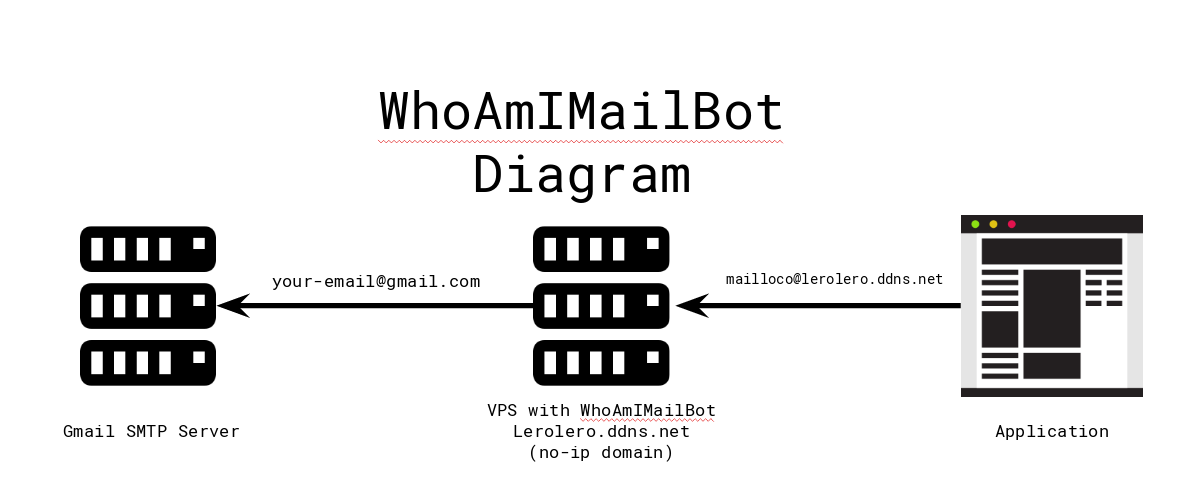
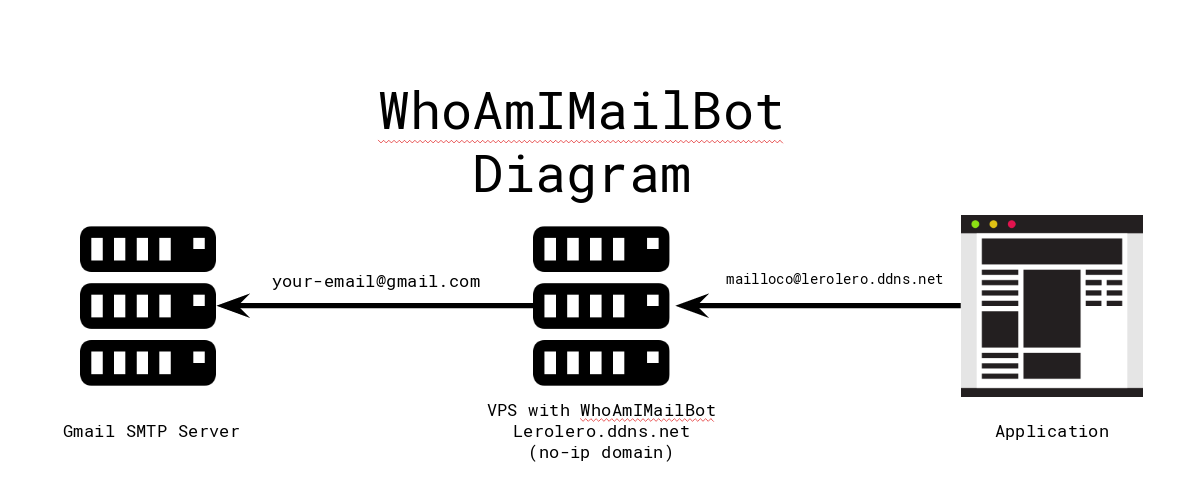
Who Am I Mail Bot is a service to mask your e-mails. It was inspired by Blur, where you can create an alias for your e-mail and use it to signup on applications. The problem with Blur is that all e-mails pass trough their infraestructure and I don't need/want anybody looking on my e-mails, so I made this project. WhoAmIMailBot is similar to Blur service but runs on your own infraestructure!
You will need:
Your VPS will run a postfix that will redirect e-mails using the postfix function of virtual alias (where you can set an e-mail address to redirect all incoming messages to another e-mail), the no-ip domain will be the domain which you'll use on your alias e-mails and the telegram bot will manage your alias. So:
git clone https://github.com/mthbernardes/WhoAmIMailBot.git
cd WhoAmIMailBot
docker build -t whoamimailbot .
docker run -d -p 25:25 --name whoamimailbot -v /data/postfix/:/data -e TELEGRAM_BOT_TOKEN="BOT_TOKEN" -e TELEGRAM_USER_ID="USER_ID" -e FAKE_DOMAIN="mail.example.com" whoamimailbot
You can download the image using the following command:
docker pull btamburi/whoamimailbot
or
docker run -d -p 25:25 --name whoamimailbot -v /data/postfix/:/data -e TELEGRAM_BOT_TOKEN="BOT_TOKEN" -e TELEGRAM_USER_ID="USER_ID" -e FAKE_DOMAIN="mail.example.com" btamburi/whoamimailbot
This image uses environment variables to allow the configuration of some parameteres at run time:
On your telegram bot you have the follow commands,
| Command | Description |
|---|---|
| /list | List all available aliases |
| /new [email protected] | Create a new alias for the given mail |
| /delete string | Delete alias by a given string |
