 s0md3v/decodify
Detect and decode encoded strings, recursively.

It can detect and decode encoded strings, recursively.
Lets take this string : s0md3v and encode it in Base 64
czBtZDN2
Now lets encode it in hex
637a42745a444e32
And now again in Base 64
NjM3YTQyNzQ1YTQ0NGUzMg==
Now lets supply it to Decodify
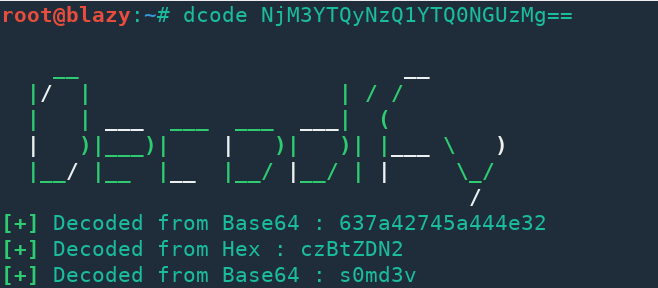
Boom! Thats what Decodify does. It automatically detects the encoding and decodes it and it does that recursively.
Warning: Decodify uses third party web services for MD5, SHA1 & SHA2 hash lookups. If you are dealing with sensitive data, you are advised to use the -s option which will prevent Decodify to use these services.
Download Decodify with the following command:
git clone https://github.com/s0md3v/Decodify
Now switch to Decodify directory and run the installer with this command:
make install
Now you can run decodify by entering dcode <string to decode> in your terminal.
To remove Decodify run the uninstaller with this command
make uninstall
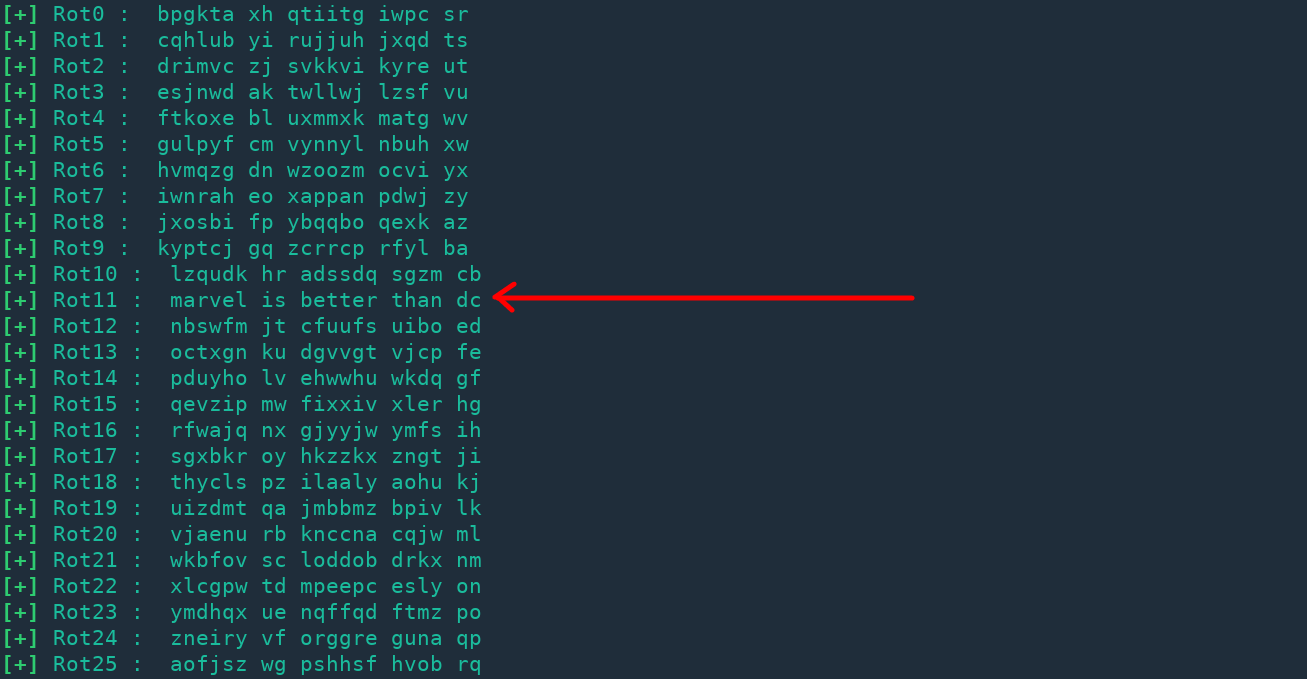
You can supply the offest by --rot option or you can tell Decodify to decode for 1-26 offest by using --rot all.
Using -rot all option on the string bpgkta xh qtiitg iwpc sr gives the following output:
You can reverse a string by using the -rev option.
If you encounter a valid encoded string which wasn't correctly processed by Decodfiy, please open an issue including the string.
You can also contribute by adding support for more encodings or by fixing my poorly writting code.
