Skip to content
KitploitKITPLOIT
ToolsExploitsBlog
Log in
Submit
ToolsExploitsBlog
Submit

Hacking, PenTest, and Cybersecurity Tools for Your Security Arsenal!

Kitploit is a directory of hacking, cybersecurity, and pentesting tools. Discover the latest project updates to find vulnerabilities, analyze systems, automate testing, and strengthen your security.

FeedsContactPrivacy© 2026 Kitploit

Tool Directory

Categories

View all categories
Loading categories
plasma — Plasma is an interactive disassembler for x86/ARM/MIPS. It can generates indented pseudo-code with colored syntax. | Kitploit
Tools/GitHubGitHub/plasma-disassembler/plasma
Static AnalysisReverse EngineeringDebuggersBinary Analysis
GitHubplasma-disassembler/plasma

plasma

Plasma is an interactive disassembler for x86/ARM/MIPS. It can generates indented pseudo-code with colored syntax.

View Repository
3.1k273557 years agoReviewed by Kitploit
Share

PLASMA

The old project name was Reverse.

PLASMA is an interactive disassembler. It can generate a more readable assembly (pseudo code) with colored syntax. You can write scripts with the available Python api (see an example below). The project is still in big development.

wiki : TODO list and some documentation.

It supports :

  • architectures : x86{64}, ARM, MIPS{64} (partially for ARM and MIPS)
  • formats : ELF, PE, RAW

Warning: until structures and type definitions are not implemented, the database compatibility could be broken.

Requirements

  • python >= 3.4
  • capstone, tested with 4.0-alpha5
  • python-pyelftools
  • pefile + python3-future
  • python-msgpack >= 0.4.6
  • c++filt (available in the binutils Linux package)
  • terminal should support UTF8 and 256 colors (if not, use the option --nocolor)

Optional :

  • python-qt4 used for the memory map
  • keystone for the script asm.py

Installation

./install.sh

Or if you have already installed requirements with the previous command:

./install.sh --update

Check tests :

make
....................................................................................
84/84 tests passed successfully in 2.777975s
analyzer tests...
...

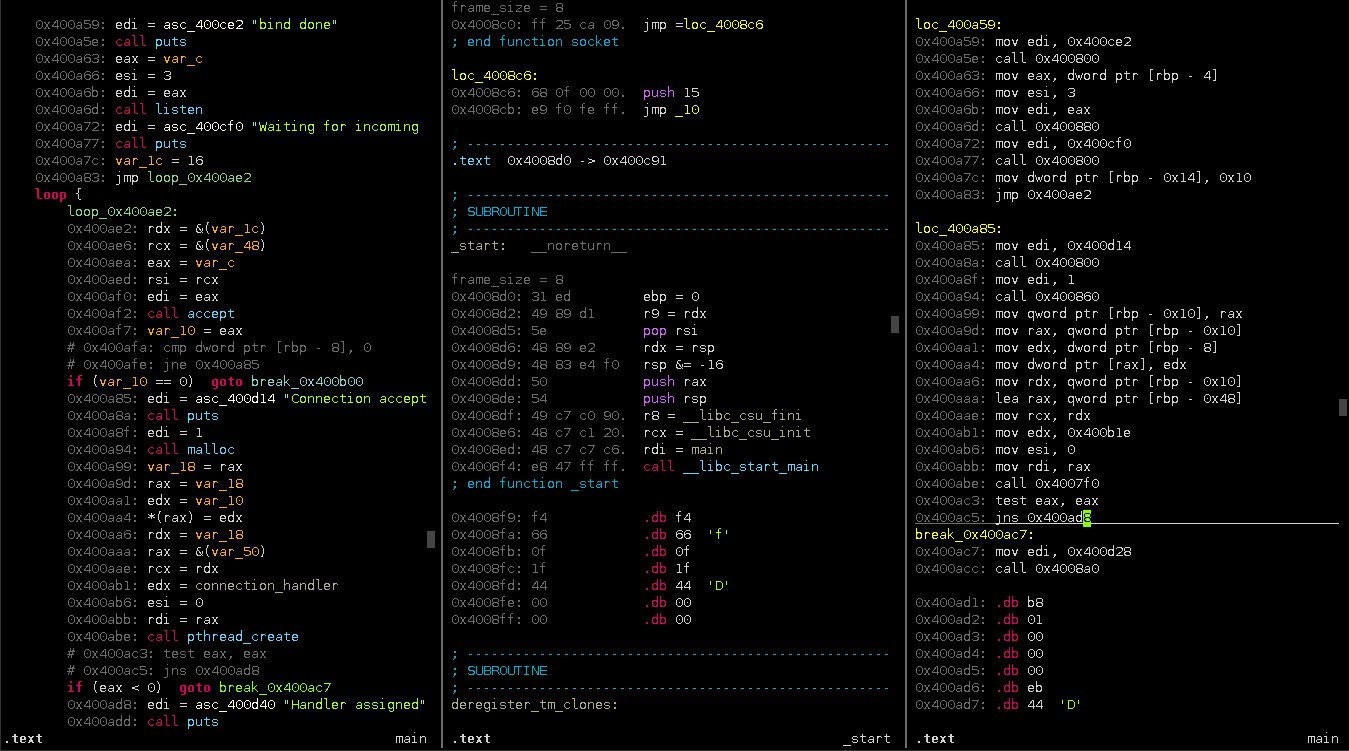
Pseudo-decompilation of functions

$ plasma -i tests/server.bin
>> v main
# you can press tab to show the pseudo decompilation
# | to split the window
# See the command help for all shortcuts
plasma

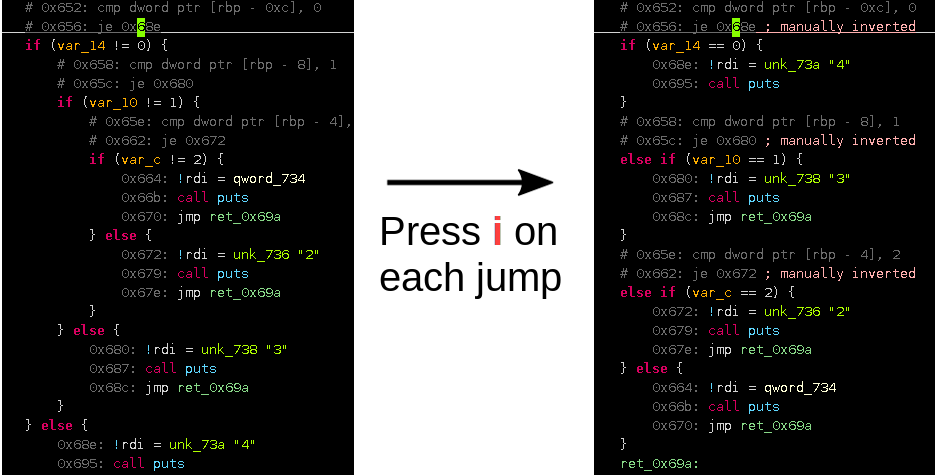
Take the control of the flow graph by inverting conditional jumps:
plasma

Scripting (Python API)

See more on the wiki for the API.

Some examples (these scripts are placed in plasma/scripts) :

$ plasma -i FILE
plasma> py !strings.py             # print all strings
plasma> py !xrefsto.py FUNCTION    # xdot call graph
plasma> py !crypto.py              # detect some crypto constants
plasma> py !asm.py CODE            # assemble with keystone
plasma> py !disasm.py HEX_STRING   # disassemble a buffer
Download Tool

Most Popular

View all →

Discover the most used tools by our community.

  • 1

    OsintHunter

    letox4/osinthunter

    🎯 The ultimate OSINT toolkit: investigation graph, confidence scoring, alias families, map, timeline and reports. 49 modules, 400+ sites, no API keys required.

    897
  • 2

    ghostlock-app

    yukonga/ghostlock-app

    GhostLock One-Tap Execution App (CVE-2026-43499)

    853
  • 3

    wifit3

    derv82/wifit3

    Wifite but USB-only & cross-platform.

    668
  • 4

    jumpserver

    jumpserver/jumpserver

    JumpServer is an open-source Privileged Access Management (PAM) platform that provides DevOps and IT teams with on-demand and secure access to SSH, RDP, Kubernetes, Database and RemoteApp endpoints through a web browser.

    448
  • 5

    looking-glass

    anonghosty/looking-glass

    CSIRT platform that ingests Shadowserver reports into MongoDB and replays them as interactive maps, analysis, findings, advisories and executive dashboards.

    417
  • 6

    SafeLine

    chaitin/safeline

    Self-hosted WAF and reverse proxy that filters malicious HTTP traffic, blocks SQL injection, XSS, and bot attacks, with rate limiting and dynamic HTML/JS encryption.

    400

Explore all tools

Browse our collection of tools

View all tools →





